

Local Development
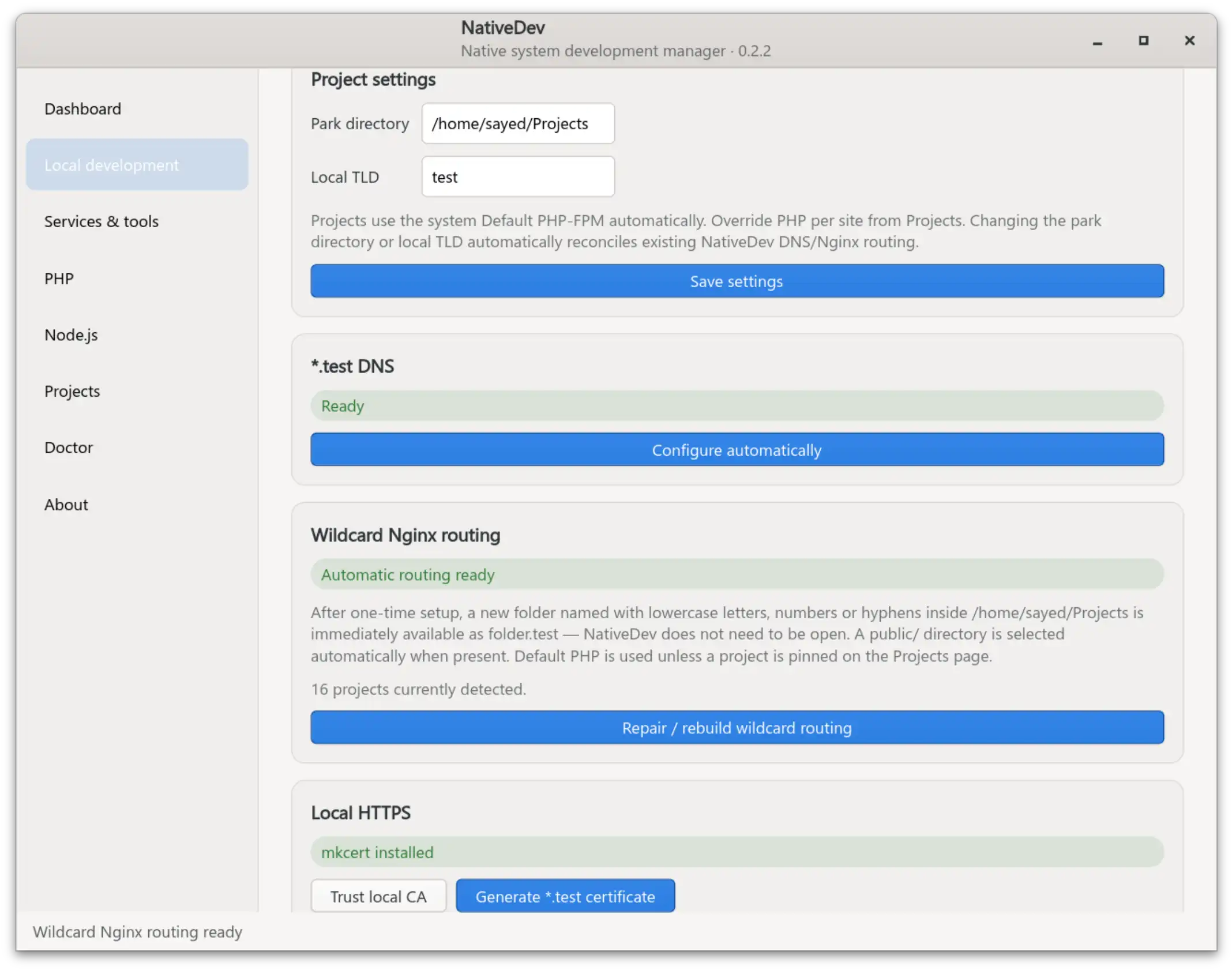
The Local development and Projects pages turn a plain folder of project directories into locally routed sites with no per-project Nginx editing. HTTP is the default path; local HTTPS is optional.
With the default TLD, a project named example uses:
HTTP   → http://example.test
HTTPS  → https://example.secure.test
If you change the Local TLD, NativeDev keeps the same model: project.<TLD> for HTTP and project.secure.<TLD> for HTTPS.
Parking a projects directory
Point NativeDev at one projects directory (default ~/Code). NativeDev scans its first-level subdirectories and lists them on the Projects page. After one-time setup, creating a new lowercase, DNS-safe folder such as ~/Code/my-app makes http://my-app.test available immediately — no need to reopen NativeDev or manually regenerate Nginx configuration.
When local HTTPS is enabled, the same project is also available at https://my-app.secure.test. The wildcard router resolves both hostnames to the same project directory.
For each project, NativeDev resolves the document root dynamically from the hostname: it uses public/ automatically when that subdirectory exists, otherwise the project root itself.
Projects page
Each detected project shows both local destinations:
HTTP   http://example.test
HTTPS  https://example.secure.test

[ Open HTTP ] [ Open HTTPS ]
Open HTTP becomes available when NativeDev's Nginx wildcard routing is ready. Open HTTPS additionally requires local HTTPS to be configured. HTTPS is intentionally optional; projects do not need TLS just to work locally.
The same project card also contains the per-project PHP selector described below.
Changing settings later
Changing Park directory or Local TLD from Local development → Save settings automatically reconciles NativeDev-managed infrastructure:
- Changing the TLD updates NetworkManager wildcard DNS and existing Nginx routing.
- If HTTPS is already enabled, changing the TLD also regenerates the NativeDev wildcard certificate for the new
*.secure.<TLD>namespace. - Changing the park directory rebuilds the wildcard router and filesystem ACL for the new location.
If reconciliation fails partway through, NativeDev restores the previous settings and attempts to restore the previous managed infrastructure rather than leaving a half-applied configuration.
PHP version per project
- By default, projects use the system's default PHP-FPM version automatically — there is no global “PHP-FPM path” field to configure.
- Each project has its own dropdown:
Default (X.Y)plus every currently installed PHP-FPM version, for projects that need to pin to something specific. - HTTP and HTTPS for the same project use the same selected PHP version.
- Project PHP requests are routed to that version's per-user socket,
/run/php/phpX.Y-fpm-nativedev-UID.sock— never the distro's sharedwww-dataFPM pool. See PHP management for how these pools are created.
Filesystem permissions
PHP requests for NativeDev project routes run as the logged-in developer (not www-data), which avoids CLI-vs-FPM ownership conflicts for cache, upload, and rate-limit directories that a project writes to at runtime. Nginx, however, still needs read/traverse permission to serve static files directly from the project's document root. NativeDev grants that automatically through:
- A read-only ACL scoped to each project's existing document root
- An inheritable read/traverse ACL on the configured park directory itself, so projects created after the initial setup work immediately without a manual permission step
NativeDev installs the system acl package automatically the first time this grant is needed, and never broadens permissions beyond the document root or the park directory — the rest of a project, and your home directory in general, are untouched.
Project ACL management assumes projects are owned by the desktop user; files owned by a different account may need ownership repaired outside NativeDev first.
Nginx configuration files
/etc/nginx/sites-available/nativedev-sites.conf(symlinked intosites-enabled) is generated only for the Local Development park router.- Its HTTP server handles
project.<TLD>on port 80. When HTTPS is enabled, the same generated file also contains the TLS server forproject.secure.<TLD>on port 443. - Persistent
*.localhostdeveloper tool routes (phpMyAdmin, Adminer) live in a separate file,/etc/nginx/conf.d/nativedev-tools.conf, and do not depend on the configured project TLD or park directory. - Generated document-root paths are quoted safely, including project directories that contain spaces.
- Every generated configuration is validated with
nginx -tbefore reload; on failure, NativeDev restores both the previous site file and its previous enabled/disabled state.
Wildcard DNS
*.<TLD> -> 127.0.0.1 is configured using NetworkManager-managed dnsmasq specifically — this is the one resolver layout NativeDev automates. The same wildcard resolution covers both project.<TLD> and project.secure.<TLD>. Other resolver setups are detected as unsupported rather than having their configuration rewritten.
Changes are applied with targeted nmcli general reload calls, not a full NetworkManager restart, and /etc/resolv.conf is never overwritten directly. After applying a DNS change, NativeDev verifies wildcard resolution actually works and restores its own DNS files if setup failed.
Optional HTTPS
NativeDev keeps HTTPS separate from the normal HTTP hostname. For the default TLD:
http://example.test
https://example.secure.test
This allows one mkcert wildcard certificate — *.secure.test by default — to cover every normal local project instead of regenerating a certificate whenever a project is created, renamed, or removed. NativeDev also includes secure.<TLD>, localhost, and 127.0.0.1 when generating its local certificate.
The HTTPS setup has two explicit actions:
- Trust local CA — trusts the user's mkcert root CA in the system trust store and performs the per-user NSS registration used by supported browsers.
certutilis required; NativeDev installslibnss3-toolsalongside mkcert when mkcert is installed from Services & tools. - Generate
*.secure.<TLD>certificate — creates the wildcard leaf certificate, installs the NativeDev-owned certificate/key for Nginx, marks HTTPS enabled, and rebuilds the wildcard Nginx routing.
A browser warning on https://project.<TLD> is expected because that is not NativeDev's HTTPS hostname. Use https://project.secure.<TLD> instead. If the secure hostname still shows a CA warning, run Trust local CA and retry the browser after the trust operation completes.
Related pages
- PHP management — installing the PHP-FPM versions a project can select
- Services & databases — installing mkcert and its browser trust dependency
- Developer tools — the separate, non-project
*.localhostrouting model - Troubleshooting — local routing and HTTPS error guidance